Big Walk Co-op / Crossplay Not Working? Fixes
Big Walk is built for co-op, but the join fails more often than it should. The usual causes: a bad join code, strict NAT, or a platform the session host cannot crossplay with. Run the checks below in order — most disconnects clear at step 2.
Big Walk is a co-op puzzle game from House House, published by Panic, released August 4, 2026 on Steam, Nintendo Switch 2 and PS5. Every walk is a peer-hosted session: one player hosts, everyone else joins their game directly. That design is why connection problems hit harder here than in server-based games — if the host's network rejects you, there is no fallback server to catch the join. The good news: almost every "Big Walk co-op not working" report comes down to one of four causes, and all four are fixable in a few minutes.
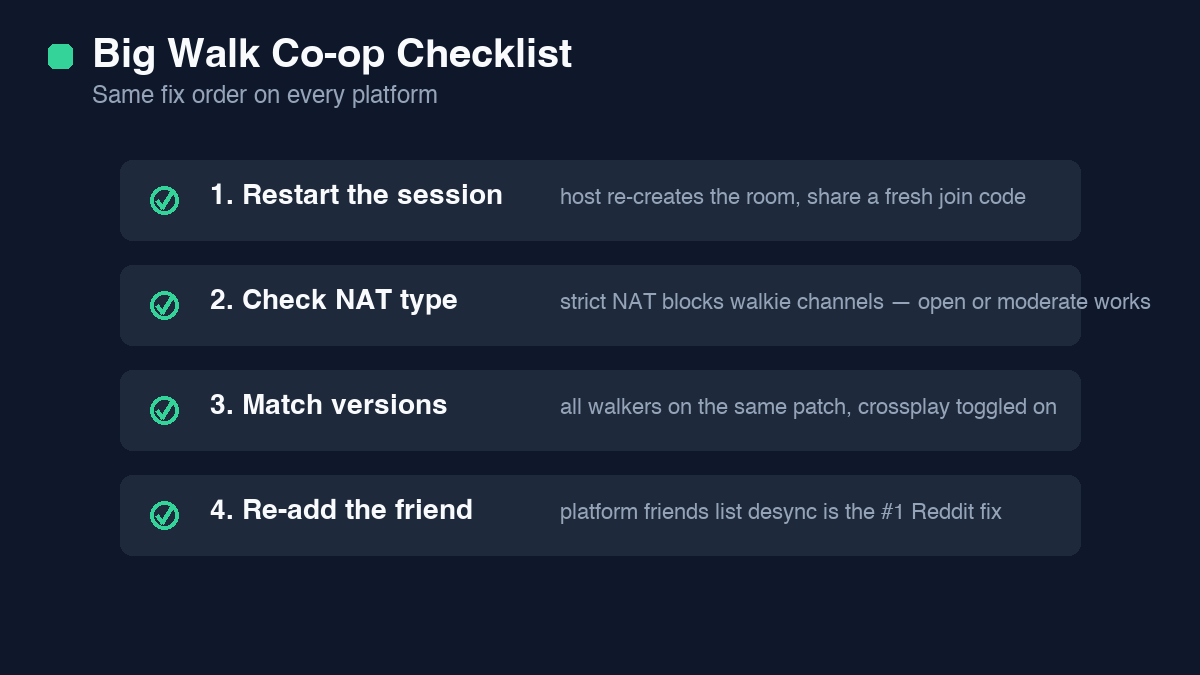
Quick fixes that solve most cases
Work through this list before anything deeper. Each check takes under a minute, and together they clear the large majority of failed joins and mid-walk disconnects.
- Code rejected: join codes are case-sensitive and expire. Ask the host to regenerate a fresh code and paste it exactly as shown — one wrong character fails with no useful error.
- Stuck on "connecting": the peer handshake is blocked, almost always by strict NAT. Switch to a wired connection or enable UPnP on your router, then retry.
- Joins then drops: the link opened but cannot hold. Have the player with the open NAT host the walk and everyone else join them.
- Crossplay invisible: the crossplay toggle is off at one end. Both players must enable it; the setting does not sync between platforms.
- Session not in list at all: version mismatch. Update Big Walk on both machines and fully restart the game, not just resume it.
Platform-by-platform checks
Big Walk runs the same peer-to-peer netcode on all three launch platforms, but each system has its own way of breaking it. Jump to the platform that is failing.
Steam
On Steam, start by verifying the game files: right-click Big Walk in your library, open Properties, then Installed Files, and run the verification. A partial download after a patch breaks session handshakes without any obvious symptom. Next, check the Windows firewall — the first time Big Walk hosted a session it asked for network access, and if you dismissed that prompt, hosting is blocked until you allow it on private networks. Finally, confirm both players are on the same Steam branch; opting into a beta or test branch makes your version invisible to players on the stable build.
PS5
On PS5, check two system-level items first. Open Settings, Network, and run the connection test to see your NAT type — Type 1 and Type 2 are fine, Type 3 is the strict case that causes most failures. Then make sure the console was not woken from rest mode mid-session; resuming Big Walk from rest sometimes leaves the old session half-open, so fully close the game and relaunch. Crossplay lives in the in-game settings, not the system settings, so toggle it inside Big Walk itself. If PSN is having a partial outage, friend-list joins fail even when direct codes still work — use a code instead.
Nintendo Switch 2
On Switch 2, open System Settings, Internet, and test the connection to read your NAT grade. Grades A and B behave like open and moderate NAT; C and below will struggle to join peer-hosted walks. Wireless is the other common culprit — the Switch 2 dock sits behind TVs and cabinets, and a weak signal drops peer links mid-walk even when the join succeeded. Move the dock closer to the router or use a wired adapter. As on every platform, both players need the same game version, so check for an update from the home screen before assuming the network is at fault.
NAT types explained
NAT — network address translation — decides how easily your machine accepts incoming peer connections, and Big Walk leans on that completely because there are no dedicated servers. Open NAT means your router passes incoming traffic freely; you can host and join anything. Moderate NAT filters some traffic; you can join open hosts reliably but should avoid hosting. Strict NAT blocks unsolicited inbound connections entirely; you will fail most joins and drop the ones that connect.
To move from strict toward open, do these in order: plug in an ethernet cable, enable UPnP in your router settings, and reboot the router so it rebuilds its table. If your ISP puts you behind carrier-grade NAT — common on mobile hotspots and some apartment networks — no local setting will fully open it, so let a friend with open NAT host instead. A quick way to confirm the fix worked: run your platform's network test again and check the NAT reading before relaunching Big Walk.
Join codes and crossplay
Big Walk has no public server browser. Every session is joined with a short code the host generates from the in-game walk menu, and that code is the whole invitation system. Codes are case-sensitive, they expire after a short window, and a code from a dropped session is dead — the host must generate a new one for each attempt. Paste the code rather than typing it; the characters that look alike are the usual failure.
Crossplay spans Steam, PS5 and Switch 2, but it is opt-in at both ends. If either player has the toggle off, codes from the other platform fail silently — no error, just a refusal. Platform friend lists are a separate system: a PSN friend still needs crossplay on and a valid code to reach your Steam session. When in doubt, both players open settings, confirm crossplay is on, then exchange a fresh code.
When nothing works
If you have a fresh code, open or moderate NAT, matching versions, and crossplay on at both ends, and it still fails, isolate the broken side. Bring in a third player: if they can join the host but you cannot, the problem is your network; if nobody can join, it is the host's. Swap who hosts and retest — a walk that fails one direction often works immediately the other way.
Most "co-op not working" threads are solved by the steps above. If yours is not, capture the exact error text, your platform, NAT type, and game version before you post or contact Panic support. "It doesn't work" gets guesses; a specific error message gets a fix.
Step-by-step
- Re-copy the join code. Codes are case-sensitive and expire after a short window. Regenerate a fresh code from the host and paste it exactly as shown — one wrong character is a silent fail.
- Check NAT type. Strict NAT blocks peer connections. Use a wired connection or enable UPnP on your router; a moderate NAT usually works, strict rarely does.
- Confirm crossplay is on. Both players must have crossplay enabled in settings; a console player and a PC player need it on at both ends or the join fails quietly.
- Match game versions. If one of you skipped the latest patch, the session browser will not pair you. Update Big Walk on both machines and restart the game fully.
- Restart the session clean. Close Big Walk, reboot the router if NAT looked wrong, then have the host start a brand-new walk instead of reviving a dropped one.
- Host on the stronger connection. Have the player with open NAT host the walk; everyone else joins. Hosting behind strict NAT is the single most common cause of mid-walk drops.
Frequently asked questions
Why won't my friend join my Big Walk session?
Nine times out of ten it is a stale or mistyped join code, or strict NAT on one side. Regenerate the code and check NAT type first — those two checks solve most reports.
Is Big Walk crossplay between PC and console?
Yes, between Steam, PS5 and Nintendo Switch 2, with crossplay enabled on both accounts. If one player has it off, the join fails silently with no error message.
Big Walk keeps disconnecting mid-walk — why?
A strict or unstable NAT drops the peer link once the session is live. Host on the open-NAT connection and use a wired network for the anchor walker.
Why does my Big Walk join code say invalid?
The code expired or a character was mistyped — codes are case-sensitive. Ask the host to generate a new one and paste it directly instead of typing it by hand.
Does Big Walk have dedicated servers?
No. Every walk is hosted peer-to-peer by one player, which is why the host's NAT type and connection quality decide whether everyone else can join and stay connected.
Can I play Big Walk co-op on different game versions?
No. Mismatched versions will not see each other's sessions at all. Both players need the same patch installed, so update before troubleshooting anything else.
What NAT type do I need for Big Walk?
Open or moderate works for joining; open is strongly recommended for hosting. Strict NAT can sometimes join an open host but will drop or block most sessions.
Related Big Walk guides
- Big Walk Tools & How to Use ThemEvery Big Walk tool explained one by one — what each does, when to use it, and the combos that break puzzles.
- Big Walk Red Tower Puzzle Solution: Step-by-Step + MapStuck on the Red Tower in Big Walk? Full puzzle solution with map location, the anchor-plate walk order, and the bridge trap that fails most runs.
- Big Walk Complete Guide & WalkthroughA complete Big Walk walkthrough: progression, the five towers, co-op basics and what to do first.
- Big Walk Price, Platforms & EditionsBig Walk price across Steam and consoles, which editions exist, and whether the co-op bundle is worth it.
- Big Walk Achievements List & How to Get ThemEvery Big Walk achievement with the fastest unlock path and the missable ones to watch for.